Magic Keyboard vs. Smart Keyboard: 5 Key Differences and Full Comparison
Despite their remarkable features, iPads are limited in usability, and a keyboard could increase functionality. If you type a lot, for instance, you’ll use a laptop or a desktop. But if you connect your iPad to a keyboard, you could use your iPad like a laptop. A keyboard will help you type faster and respond to those urgent emails on the go.
Once you’ve decided to get an iPad keyboard, you can choose between a Magic Keyboard and a Smart Keyboard. But how do these two keyboards compare? What are the main differences and what factors must you consider before choosing one?
Below, we closely examine these two great products to help you make an informed buying decision. Let’s jump right in!
Magic Keyboard vs. Smart keyboard: Side-by-Side Comparison
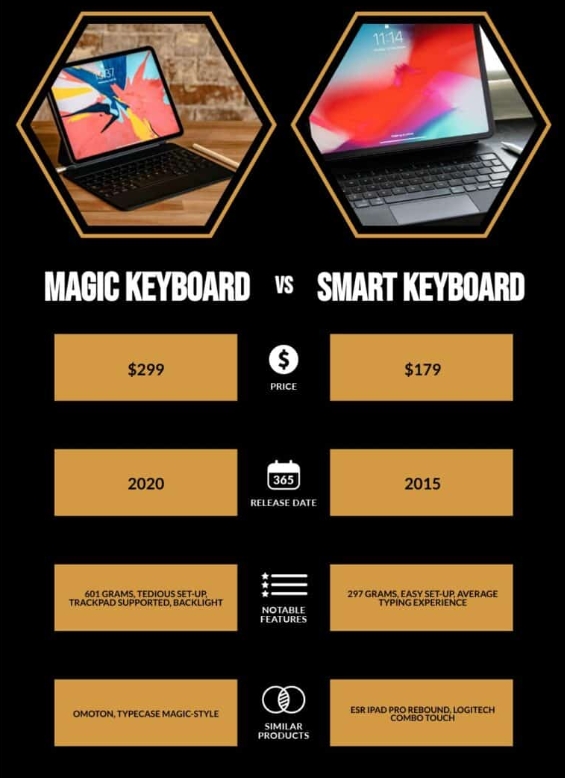
| Magic Keyboard | Smart Keyboard | |
|---|---|---|
| Launch Date | 2020 | 2015 |
| Weight (in grams) | 601 | 297 |
| Pass-Through USB-C Port | 1 | 0 |
| Set-Up | Tedious | Easy |
| Trackpad Supported? | Yes | No |
| Backlight | Present | Absent |
| Viewing Angles | Infinite | 2 |
| Typing Experience | Excellent | Average |
| Average Price | $299 | $179 |
- Compatible with the iPad Pro (3rd, 2nd and 1st generation) and iPad Air (5th and 4th generation)
- Trackpad, a USB-C port for charging, backlit keys, and front and back protection
- New floating cantilever design
- Folds into a case
- Compatibility: iPad (9th generation), iPad (8th generation), iPad (7th generation), iPad Air (3rd generation), 10.5-inch iPad Pro
- Smart Keyboard lets you write a term paper or create a presentation on a full-size keyboard whenever you need one
- Connects easily without the need for pairing or charging, so it’s always ready to go
- Folds to create a slim, lightweight cover
- Apple Smart Keyboard is a front cover only
Magic Keyboard vs. Smart Keyboard: What’s the Difference?
The Magic Keyboard that Apple launched in 2020 differs significantly from the 2015 Smart Keyboard, so we’ve outlined the main differences you should consider before making your choice.
Portability
If you’re the type of person who needs their mobile device constantly, you know your gadget must be portable. When it comes to portability, the Smart Keyboard beats the Magic Keyboard. Weighing a mere 297 grams, the Smart Keyboard is highly portable.
The Magic Keyboard, on the other hand, weighs over 600 grams. When you add the weight of your iPad, the total weight is close to the weight of some laptops. If you’re considering buying a keyboard to help your iPad function as a laptop replacement, buying a heavy keyboard could prove disappointing.
Typing Experience
If you’re used to typing on your iPad without a keyboard, you know how tedious and limiting it is. When shopping for a keyboard, you desire one that will give you a easy experience. With a good keyboard, your typing speeds can go higher and you can even multitask.
The new Magic Keyboard is simply magical by way of its typing experience. Compared to the Smart Keyboard, the Magic Keyboard is better in several ways, which we’ll discuss in more detail below.
Infinite Viewing Angles
If you care about comfort when typing (and you probably do), you’ll find the Magic Keyboard superior to the Smart Keyboard.
Since the Smart Keyboard allows only two viewing angles, your typing activities are greatly hindered. The limitation in viewing angles means you won’t type for long before experiencing neck strains and other discomforts.
With the Magic Keyboard, the viewing angles are unlimited. You can therefore type in infinite positions without straining your neck. When using the Magic Keyboard, your iPad hangs over the keyboard creating enough room for typing. The Magic Keyboard lets you turn and twist the iPad to any angle you desire. Whether you’re typing in bed or on the metro, this keyboard is a versatile ally.
Backlight
Whether you’re using your iPad to write, browse the internet, or watch your favorite movies or TV shows, you might need to conduct your activities in the dark. Keyboard control is substantially limited when your keyboard is not adequately lit, which is one of the downsides of the Smart Keyboard. The Magic Keyboard comes with backlit keys, enabling you greater control in the dark and, therefore, more convenience.
Track Pad Support
The ability to use a trackpad when working on the iPad considerably influences productivity. With a trackpad installed, you can work blissfully without touching the screen.
The trackpad almost instantly upgrades your iPad to the level of a laptop, and if you’re considering using your iPad as a laptop replacement, this would be a crucial consideration. A trackpad enables you to access a vast range of Apple options you would otherwise be unable to.
While the Smart keyboard does not have a trackpad, you could use a mouse or an external trackpad to put it on par with the Magic Keyboard. You are better off using the Magic Keyboard when you need to use your iPad more productively and don’t want to use a mouse or external trackpad.
Near-Noiseless Operation
You know how annoying it is to sit next to a person typing on a noisy keyboard. The Magic Keyboard operates smoothly and almost noiselessly and, when you use it, you never need to worry about upsetting the person sitting next to you.
Pass-Through USB-C Port
The Magic Keyboard has a pass-through USB-C port, while the Smart Keyboard doesn’t. The USB-C port on the Magic Keyboard allows the iPad’s charger to be connected directly to the keyboard, rather than to the iPad itself. This allows for more convenient charging and eliminates the need to unplug and re-plug the charger from the iPad.
The Magic Keyboard enables you to charge your iPad and guarantees that a power outage will not disrupt your work.
Build and Durability
The main reason the Magic Keyboard is heavier than the Smart Keyboard is the material used to construct it. The Magic Keyboard has metal plates inside the cover, and that’s why you can’t fold it. The Smart Keyboard, on the other hand, easily folds and warps. While the lightness of the Smart Keyboard makes it more portable, the construction of the Magic Keyboard makes it more durable.

The Magic Keyboard is more durable than the Smart Keyboard due to its heftier construction.
Price
Despite its strengths, the Magic keyboard is a pricey product; this is an all-important consideration for most people. At around $300, the Magic Keyboard is $120 more expensive than the Smart Keyboard. Is this a crucial consideration? We think it is!
When you remember that an average-priced iPad costs about $900, and then add the cost of the Magic Keyboard, your total expense will be around $1,200. For that amount of money, you could get a really great laptop.
The price difference between these two keyboards is enormous, and you might have difficulty convincing yourself why you should pay so much more for the Magic Keyboard when the Smart Keyboard is capable of many tasks. Ultimately, the final decision should be guided by your reason for buying the keyboard.
If you’re a writer or student who spends a lot of time typing, including working in the dark to beat crazy deadlines, the features of the Magic Keyboard might make it more attractive despite the higher price.
Magic Keyboard vs. Smart Keyboard: 7 Must-Know Facts
- The Magic Keyword is priced way above the Smart Keyboard. Considering the similarities between the two products, you’ll be hard-pressed to justify spending $120 more to get the Magic Keyboard.
- The Magic Keyboard is much heavier than the Smart Keyboard, and if you intend to use your iPad to replace your laptop, the Magic Keyboard might fail to meet your expectations.
- For versatility, the Magic Keyboard outshines the Smart Keyboard. The former guarantees an excellent typing experience and enables you to work in diverse environments. However, the Smart Keyboard will meet most of your typing needs, which might not be a critical factor when deciding which keyboard to buy.
- The Smart Keyboard is easier to set up than the Magic Keyboard.
- The Magic Keyboard is more adjustable than the Smart Keyboard. The Magic Keyboard lets you tilt your iPad at different angles for the ultimate viewing experience.
- The additional USB-C port on the Magic Keyboard helps you simultaneously charge and work on your iPad. This is a critical consideration for users with huge documents to copy or download –- you never need to worry about running out of power.
- The Magic Keyboard is more durable than the Smart Keyboard.
Magic Keyboard vs. Smart Keyboard: Which One is Better?
The ability to pair your iPad with a keyboard makes your gadget more productive, and when searching for a reliable keyboard, you might have difficulty choosing between the Magic and Smart Keyboards.
While the Smart Keyboard is light and highly portable, its construction material makes it less durable. If you use your iPad for intense typing jobs, the Smart Keyboard might be uncomfortable because of its limited adjustments.
On the other hand, if you need a keyboard to perform routine tasks that don’t call for excessive use of the keyboard, you might not see any logic in investing in a product as pricey as the Magic Keyboard. All factors considered, we can see no clear-cut justification for the hefty price differential between these products, and we are happy to recommend the Smart Keyboard.
Frequently Asked Questions
What is a Magic Keyboard?
A Magic Keyboard is an external keyboard designed and produced by Apple for use with various Apple devices, including iPads, Macs, and iPhones. It is a wireless keyboard that connects to your device using Bluetooth technology and features a slim profile, a rechargeable battery, and a scissor-switch mechanism for a comfortable typing experience.
What is a Smart Keyboard?
A Smart Keyboard is an external keyboard designed and produced by Apple, Inc. for use specifically with iPads. It is a lightweight and portable keyboard that connects to your iPad using the Smart Connector, which eliminates the need for Bluetooth pairing or charging. It features a water-resistant and durable fabric material and folds into a protective cover for your iPad.
Is it worth it to buy the Magic Keyboard?
Apple’s Magic Keyboard is a reliable and decent keyboard for your iPad Pro or iPad Air. Typing on it is comfortable and the case does a good job of protecting the iPad from any knocks. The viewing angle is decent for most purposes although artists may find a dedicated iPad drawing stand better for their needs.
What does a Smart Keyboard do?
The Smart Keyboard Folio is designed to deliver a great typing experience on a full‑size keyboard whenever you need it. Its durable, lightweight cover protects both the front and back of your 11‑inch or 12.9‑inch iPad Pro. Simply attach it to your iPad Pro and type away.
What's the difference between a Magic Keyboard and a Smart Keyboard?
A major difference between the Smart and Magic Keyboards is the trackpad, which gives an advantage to Magic Keyboard. But you may achieve the same result with a Smart Keyboard by connecting an external mouse or trackpad. Mostly basic trackpad gestures for iPad are the same as for Mac, but there are unique ones only for iPad.
What's so special about Apple's Magic Keyboard?
The Magic Keyboard delivers a remarkably comfortable and precise typing experience. It’s also wireless and rechargeable, with an incredibly long-lasting internal battery that will power your keyboard for about a month or more between charges.
The Magic Keyboard is designed for comfortable typing with minimal noise, featuring a low-profile design and scissor-switch keys. It also includes integrated function keys that provide quick access to common features such as screen brightness, volume control, and media playback.
Does the smart keyboard fold back?
The Magic Keyboard’s odd design means it can’t fold all the way back, with the keyboard parked behind the screen. You either use it as a laptop thing or fold it shut.