Mini-ITX vs. Micro-ATX – What’s the difference?
So, you want to build a custom PC, but don’t know what type of motherboard to buy. Not all motherboards are built the same way. They can vary in size, cost, and features. All these can make a world of difference in your computer’s performance. In this article, we will put Mini-ITX vs Micro-ATX head-to-head, with their specs, differences, as well as their pros and cons. Read on to find out which model comes out on top.
Mini-ITX vs. Miro-ATX Specs
| Mini-ITX | Micro-ATX | |
|---|---|---|
| Board dimensions | 170mm by 170mm | 244mm by 244mm |
| PCIe slots | 2 | Up to 7 |
| RAM Capacity | Lower RAM capacity | Higher RAM capacity |
| Compatibility | Microsoft Windows, Linux OS | |
| Power connector | 20- or 24-pin | Standard power supply |
Mini-ITX vs. Micro-ATX: 4 Must-Know Facts
- Mini-ITX boards are pretty much the only option when it comes to small form factor builds.
- Micro-ATX motherboards are the perfect budget-friendly option.
- Because Mini-ITX motherboards are marketed toward higher-end markets, the aesthetics of the boards tend to be better.
- Neither the Mini-ITX or Micro-ATX are suitable for extreme overclocking.
Mini-ITX vs. Micro-ATX: What are the Differences?
Dimensions
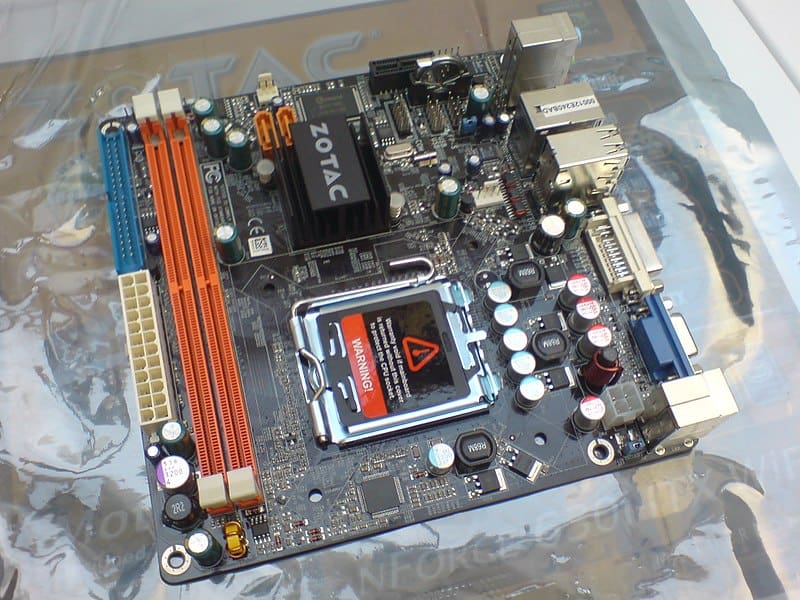
Sizing and dimension play a surprisingly big role during PC building. So, you don’t want to gamble. Obviously, the Mini-ITX and Micro-ATX are square instead of the standard rectangle, as seen on an ATX board. However, Mini-ITX measures 6.7″x6.7″ while the Micro-ATX 96″x9.6″.
Even though both formats are smaller than standard ATX motherboards in many small form factor cases, the Mini-ITX boards can produce consistent results because of their smaller size.
Expandability
One of the motivations for building a PC is being able to expand and upgrade components on your own. Expandability plays a significant role in choosing the correct motherboard for you.
Of course, a motherboard’s expandability depends on the model you’re buying. But typically, you can expand Micro-ATX boards more than Mini-ITX. Due to the petite size, you only see one full-sized PCI Express slot on Mini-ITX motherboards. The PCI Express slot is where you will put components like a GPU, Sound Card, or Capture Device. On a Micro-ATX board, you can expect 2 PCI Express slots.
Micro-ATX motherboards typically have 4 RAM slots, whereas Mini-ITX only has two. But that does not mean you cannot have the same amount of RAM. For example, you can still have 32GB of RAM in a Micro-ATX and Mini-ITX motherboard. But with the four slots in the Micro-ATX, you can just buy another 32GB kit and upgrade to Cost
Again this is another factor when shopping around for a motherboard. Of the two models, the Micro-ATX board is the most affordable one. The Micro-ATX costs $129.99, and the Mini-ITX costs $229.99. The reason Mini-ITX costs more than its rival is because of the amount of engineering that goes into its development. Not to mention, Mini-ITX boards cater to a smaller audience, making them a niche product, which drives up the price.
- Supports AMD 3rd Gen Ryzen and 3rd Gen Ryzen with Radeon Graphics processors
- Support for Windows 11 64-bit, support for Windows 10 64-bit
- Dual Channel ECC/ Non-ECC Unbuffered DDR4, 4 DIMMs
- Backward compatible with Multi-Gig (10/100/1000/2500Mbps)of RJ-45 Ethernet
- 10 plus 2 Phases Digital Twin Power design with 50A DrMOS
- Advanced thermal design with enlarged VRM heatsinks
- Ultra-durable PCIe 4.0 Ready x16 Slot
- Supports AMD Ryzen 5th Gen/ 4th Gen/ 3rd Gen/ 2nd Gen
- Dual Channel ECC/ Non-ECC Unbuffered DDR4, 2 DIMMs
- Twin 8 2 Phases Digital VRM Solution
- AMD Wi-Fi 6E 802.11ax & BT 5.2
- 2 memory slots
Ease of Building
How much effort it takes to build a custom PC matters. So keep that in mind as you build your first gaming rig. As a rule of thumb, avoid using super small form factor builds as they make PC building more frustrating. If you are explicitly looking at a Mini-ITX motherboard to create a tiny console-like PC build, some nimble fingers will be involved. But if you do want that small form factor vibe, most of the time, Mini-ITX is the way to go. Most case manufacturers are going too small for even Micro-ATX boards nowadays.
Mini-ITX vs. Micro-ATX: Pros and Cons
 , via Wikimedia Commons” />
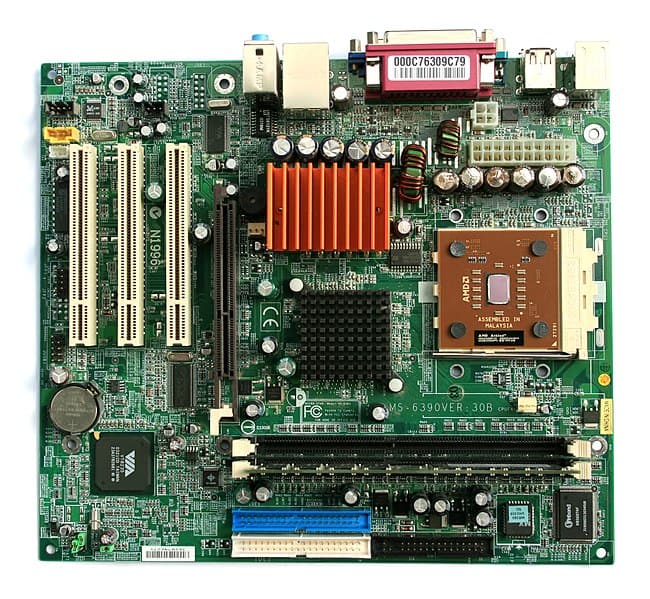
Micro-ATX motherboards typically have 4 RAM slots and a similar number of PCIe slots.
| Form Factor | Pros | Cons |
|---|---|---|
| Micro-ATX | • The least expensive option • Ideal for single-GPU PC builds • Can fit into pretty much any case • Higher RAM capacity than mini-ITX |
• Not suitable for multi-GPU setups • Not ideal for extreme overclocking • Typically lack in aesthetics |
| Mini-ITX | • Best option for smaller cases • Better aesthetics than micro-ATX |
• More expensive than micro-ATX • Won’t work for multi-GPU setups • Not ideal for extreme overclocking • Typically, only have two RAM slots |
Mini-ITX vs. Micro-ATX: Which is Better
If you want to build the ultimate budget-friendly, price-to-performance machine, then micro-ATX is the right motherboard. The cost on these motherboards is typically very friendly, and you will not be leaving that much performance on the table. The one big downside for some people could be the aesthetics of micro-ATX motherboards, which isn’t appealing.
However, if you want to have the smallest of small form factor PC, then, Mini-ITX is the only option for you. Because of its narrow niche, the motherboard’s price tends to be slightly higher. Overall, Micro-ATX comes out on top.
Check out the Micro-ATX on Amazon.
Frequently Asked Questions
Is Micro-ATX bigger than Mini-ITX?
Micro-ATX measures 9.7″x9.7″ and is slightly bigger than Mini-ITX boards that measure 6.7″x6.7″.
Why is Micro-ATX cheaper?
The Micro-ATX motherboard is a smaller motherboard that saves space and energy and is generally cheaper as a result.
Are ITX builds more expensive?
The price does depend on the components and case you are planning to put into the build, but typically Mini-ITX builds do cost more than a Micro-ATX build.
What is the smallest PC case in the world?
Currently, the smallest case in production is the Skyreach 4 Mini. It measures 13.7″x8.85″x2.5″, which is just barely bigger than a Mini-ITX motherboard.
Is Mini-ITX better than Micro-ATX?
They both have their different use cases, but in the current market, Mini-ITX motherboards are marketed as the more performance-focused board. In contrast, the Micro-ATX is aimed more at the budget-friendly market.