How to Get More Storage on Xbox One in 4 Steps, With Photos
New Xbox consoles typically come with an internal memory of between 500 GB t0 1 TB. At first, this seems like enormous storage, but it’s not when it fast fills up with a few games. Getting more storage on an Xbox One is easy. All you have to do is plug in an external hard drive.
Many Xbox One games take up over 50 GB, which is a problem. Some games even go over 100 GB. If you own one of the early Xbox One versions, you likely only have 500 GB to work with. But the good news is you don’t have to purchase an expensive internal hard drive to expand your console’s storage space. Follow the steps below to get more storage space on XBox One today.
Step 1: Get a Large Storage Device

The first thing you need to do to expand your Xbox One’s storage is to purchase a storage device. The most common choice is an external hard drive, but you can also choose a portable hard drive or even a large flash drive. The most important thing to look for is that the device is at least 128 GB and has USB 3.0 or 3.1.
- Enormous 2TB external hard drive space
- Bold, alluring design to compliment your Xbox
- Highly portable HDD with USB 3.2 Gen 1,
- Comptible with Xbox One, Series S, and Series X
- 3-year Rescue Data Recovery Services 1-year limited warranty
Step 2: Connect the Drive to the Xbox

Once you have a compatible drive, you need to plug it into the Xbox One console. You can use any of the Xbox console’s USB ports, but one on the back tends to work best if you aren’t planning on removing it. This way, you keep the front ports open to controllers or accessories. If you have an external hard drive, don’t forget to plug its power cord into the wall.
Step 3: Format the Drive
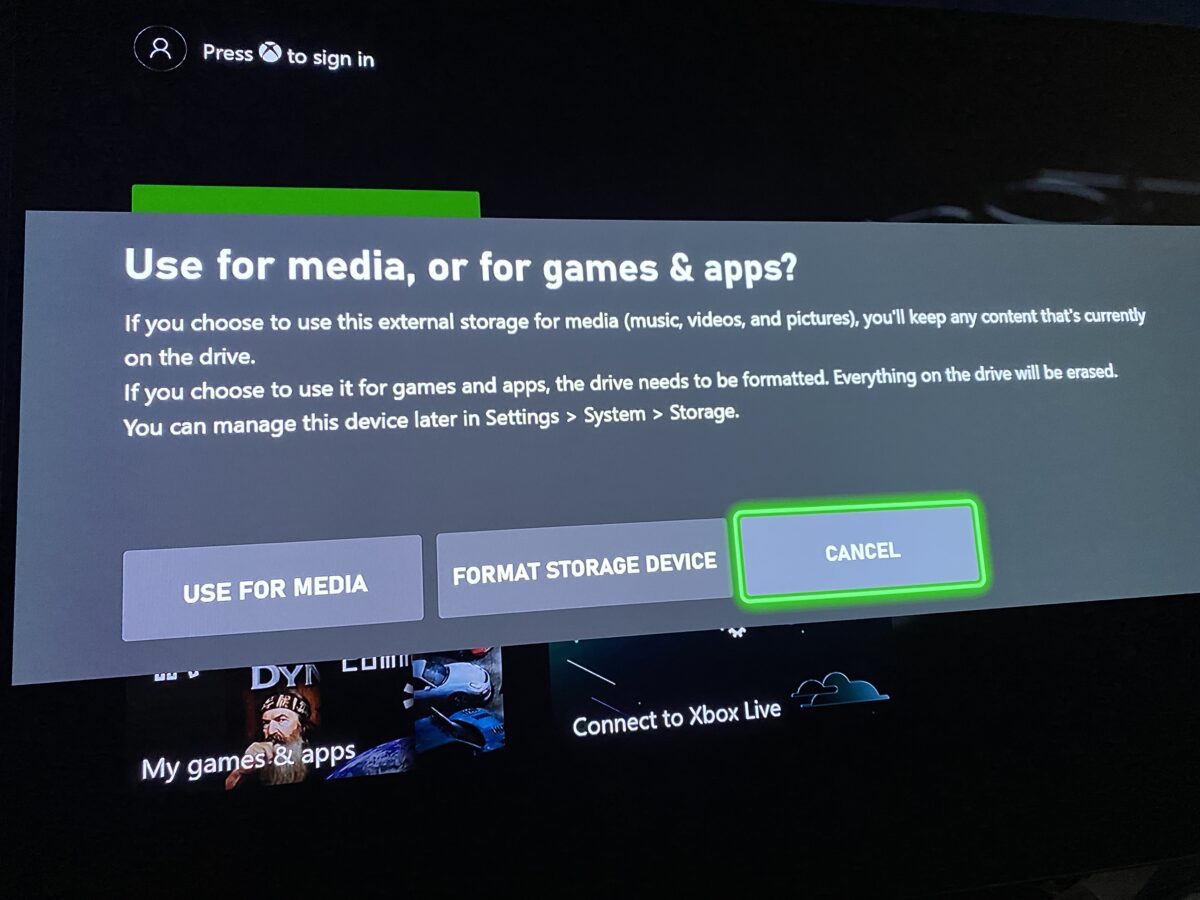
With the drive connected, turn the Xbox on. The console will detect the newly connected hard drive and prompt you to choose its purpose. It can be used for pictures and other media or game storage. If you want to store games (which is the most common use), you will then be asked to format the drive.
Additionally, you will be asked if the drive will be used with multiple consoles. Ideally, you should use one drive with one console. This will allow the console to perform automatic updates on the games and apps that are installed on it. Regardless of your decision, once formatted, you will only be able to use the drive with an Xbox console.
Step 4: Begin Using the Extra Space
Once you format the drive, you can begin installing more games. Simply insert a disc, or download a game from the Xbox Store. You can then go to “My Games & Apps” to view all of the installed content.
The following video from TheRenderQ provides an excellent explanation of why you should get an external hard drive for your Xbox and demonstration on how to use one.
Internal Drive
Unlike the original Xbox 360, which had a removable hard drive on the top, or even the later model, which had an internal removable hard drive, the Xbox One does not. Instead, all Xbox One consoles have unswappable internal hard drives. So, your only option to get more storage space is to use an external drive. Strangely, Microsoft backtracked on the Series consoles as they have an expansion slot.
Xbox 360 Replacement Hard Drive
- Expands console storage by 320 GB storage
- Comes with 3 Games fulfilled via DLC card
- Saves reloading from disc when you want to game
- It can hold downloaded movies, music, and more
- Excellent value for money
Media Hard Drive
We briefly mentioned using your hard drive to store other types of media. Doing so allows you to store content such as videos to use on the Xbox console. You will also be able to access this content and use the hard drive as normal on a computer. However, with the hard drive set up to hold media, you cannot store Xbox games on it.
Frequently Asked Questions
Do you need an Xbox branded external hard drive?
No, while you will find many hard drives advertised to work with Xbox, it doesn’t need to say this in order to work. Instead, make sure the drive meets the minimum requirements.
Can a flash drive be used as an external storage device?
Yes, a flash drive can be used as a storage device. Just make sure it is at least 128 GB and supports USB 3.0/3.1.
Will you lose all data on the hard drive when using it on Xbox?
If you format the drive to store games on it, everything will be wiped out. If there are files on the hard drive you should back them up or transfer them to another drive.
Can you use one hard drive on multiple Xbox consoles?
Yes, it is possible to use one hard drive with multiple Xbox consoles. When you set it up on both consoles be sure to select that it will be used with multiple consoles.
Can you use an external hard drive on the Xbox Series consoles?
Yes, you can use an external hard drive for the Series S and X. However, you can only store media or older Xbox One games on it because newer games designed for the Xbox Series S|X rely on the consoles’ solid state drive.