How To Track An Amazon Package In 4 Steps, With Photos
Ever since Jeff Bezos founded Amazon back in 1994, the e-commerce titan has grown from a small online marketplace to a global economic force. Today, Amazon ships over one and a half million packages daily. Where do all these items go, and how can you track yours? Amazon ships worldwide and allows you to track your delivery. This guide will show you how to track an Amazon package in four easy steps, complete with photos to follow along.
Why Track An Amazon Package?
Beyond the basic reason that you simply want to know where your order is and when it’s going to arrive on your doorstep, there are other reasons to track an Amazon package. They range from safety and security to accountability and trust, each being just as important as the last. Allow us to elaborate.
Sometimes, Amazon packages can get lost or stolen during delivery. By tracking your package on delivery to you, you can effectively monitor its progress and make sure it gets to the right place. Beyond this, Amazon packages are occasionally delivered to the wrong address. Sometimes a package is marked as delivered but has been received it.
Tracking is also important for the purpose of monitoring for delays or holdups that might push your delivery date back. Due to unforeseen circumstances, Amazon packages occasionally arrive after their anticipated date. By tracking your package’s progress, you can quickly spot any problems and take appropriate action to resolve them if necessary.
How To Track An Amazon Package
Now that you know the importance of tracking an Amazon package, let’s get into the actual steps. Once you get to the right page, Amazon makes it really easy to figure out where your orders are and when they’ll be arriving. However, they don’t always make it as easy to get to the right page in question. Thankfully, that’s what this guide tackles.
Below, we show you how to track an Amazon package, complete with step-by-step instructions and photos along the way.
Note: These steps work best from a computer.
Step One: Check Your Email
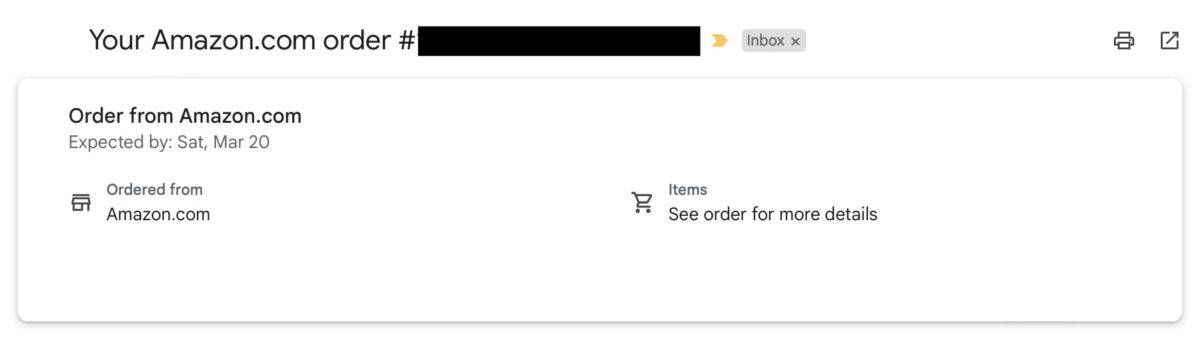
After placing an Amazon order, the site will automatically forward you an email confirmation complete with a tracking number. While it’s not likely to tell you anything useful after placing your order, you can always check back hours or a day later to check for any updates.

Step Two: Go To Amazon
If you don’t feel like digging through your email in search of one particular order’s tracking number — which can be a hassle if you’re a frequent Amazon shopper — you can conveniently track your package from Amazon’s site. To do this, you’ll need to go to Amazon and log into your account if you haven’t already.

Step Three: Find Your Order
Next, navigate your cursor to the tab that displays your name (located to the right of the search bar). This will release a dropdown menu. Look for “Orders,” located right underneath “Account” at the top of the dropdown menu. Click this to see a compilation of your recent purchases.

Step 4: Track Your Package
Scroll through your list of orders in your Amazon account until you spot the order or the product that you’d like to track. You should see a button labeled “Track Package” sitting beside the order. Click this, and you’ll be taken to a page displaying the current status of your order.
On this page, Amazon should provide you with all the information you need — namely, the tracking number and the carrier (is it coming via UPS, USPS, FedEx, or some other method?). Clicking on the tracking number will give you even more information. You’ll see specific details about the package, the last known location, and the expected delivery date.
Alternate Ways To Track An Amazon Package
Amazon’s hold on the e-commerce industry is massive, and its empire is wide-ranging and expansive. As such, it’s not surprising to know you can track an Amazon package in different ways. In addition to this email method mentioned above, below are three other ways to figure out your Amazon package’s location and delivery date:
- The Amazon App
- Third-Party Trackers
- Amazon Customer Service
The Amazon App
If you’d rather not boot up your computer and would prefer the convenience of tracking your Amazon packages from mobile device, you’re in luck. Simply download the Amazon app to your smartphone, log in, and start tracking your packages with ease. Once you access your account, click the three lines in the bottom left of the screen, and then tap orders. You can also view your entire order history in one concise location and even make new purchases. It’s that simple!
Third-Party Trackers
If you don’t fancy the Amazon app, you can also choose to track your packages using a third-party service. Several great third-party options are available to you. One good and popular option is ParcelTrack. This service allows you to track packages from multiple carriers all in one place. Another option is Deliveries, available for iOS and Android devices. You can also enter your tracking number into the Google search bar. This will tell you its location and delivery date.
Amazon Customer Service
Lastly, you can contact Amazon customer service and ask them about your package. If your package just hasn’t shown up on the expected date of delivery, you can always contact Amazon customer service for additional assistance. To do this, click the “Help” button on Amazon’s site or on their app. Amazon customer service is also accessible via the “Contact Us” section on the site or app. From there, you can then choose to talk to someone over email, phone, or chat. Just make sure you have your account and tracking info, if possible.
Frequently Asked Questions
Is Prime shipping available for all Amazon products?
There are millions of items available with Prime shipping on Amazon. These items can be sold by either Amazon or third-party sellers. In other words, both can qualify for Amazon Prime shipping. However, not all items on Amazon come with Prime shipping. You can filter your search results to only show Prime-eligible items, or you can look for the Prime logo on product pages to determine whether or not it qualifies.
Can you only get Prime shipping with a Prime membership?
Prime shipping is an exclusive feature for Prime memberships. Memberships cost around $139 per year or $14.99 per month. By subscribing, you get free two-day shipping on millions of eligible items, plus other benefits such as access to free movies, TV shows, and music through Amazon’s various streaming services.
What happens if a Prime shipment takes longer than two days to arrive?
If your Amazon Prime shipment is late or arrives after the posted date, you could be eligible for a free one-month extension of your Amazon Prime membership. To find out if you qualify for this extension, you can contact Amazon customer service and provide them with the relevant information concerning the late shipment.
Can friends and family use my Prime membership?
Yes, friends and family can use your Amazon Prime membership — just as long as you grant them permission. In addition to the ability to add someone in your household to your membership via a second profile, you can also opt to share your login information with a trusted individual (or simply place the order for them and ship it to their desired address).
How long does Prime shipping last after canceling your membership?
When you cancel your Prime membership, you have until the end of the billing cycle to continue enjoying your Prime benefits. This includes Prime shipping, Prime Video, Amazon Music, and so on. If you cancel on the last day of your billing cycle, you will lose benefits sooner. If you cancel at the start of a new billing cycle, you will have close to a month of benefits until they are revoked.