Steelcase Leap Chair Review: The Ultimate Ergonomic Seating Experience
Hey there, fellow chair enthusiasts! If you‘re anything like me, you know that a good office chair is more than just a place to park your butt for 8+ hours a day. It‘s an investment in your health, comfort, and productivity. And when it comes to high-end seating, few chairs can match the Steelcase Leap.
I‘ve had the pleasure of using the Leap chair in my home office for the past year, and let me tell you – it‘s been a game-changer. In this in-depth review, I‘ll share my personal experience with the Leap and dive into all the juicy details that make this chair a top pick for ergonomic seating.
Overview: What Makes the Steelcase Leap Special?
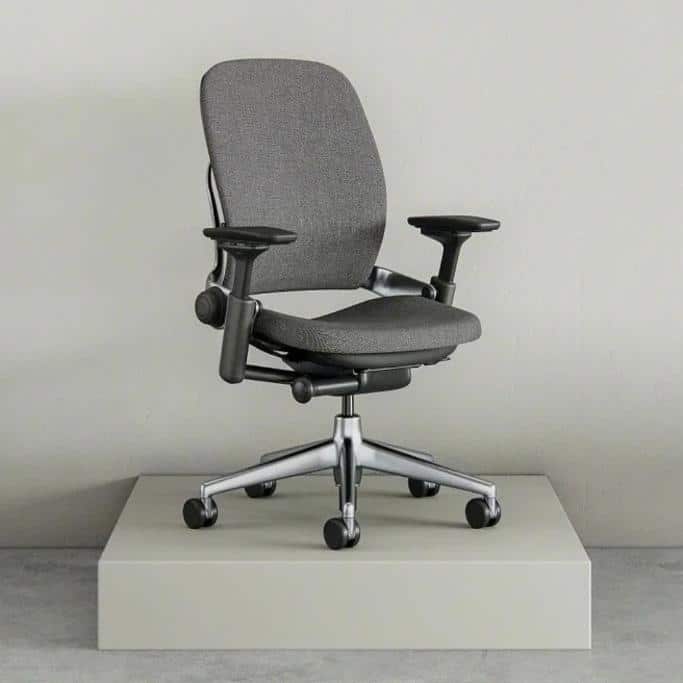
First, let‘s start with the basics. The Steelcase Leap is a high-end ergonomic office chair designed to provide optimal support and comfort for long sitting sessions. It features a unique LiveBack technology that mimics the natural shape and movement of your spine, along with a highly adjustable design that allows you to customize the fit to your body.
Some of the key features that set the Leap apart include:
- LiveBack backrest that flexes and adapts to your movement
- Flexible seat edge that relieves pressure on the back of your legs
- Adjustable lumbar support for targeted lower back support
- Highly customizable with options for fabric, leather, colors, and add-ons like a headrest and armrests
- Sturdy and durable construction with a 12-year warranty
Basically, if you‘re looking for a chair that will keep you comfortable and supported no matter how long you sit, the Leap is a top contender. But of course, premium features come at a premium price – the Leap starts at around $1,000 and can go up to $1,500 or more depending on the options you choose.
So, is it worth the investment? Let‘s take a closer look.
Ergonomic Design: How the Leap Supports Your Body
As someone who‘s dealt with back pain and poor posture from years of sitting in sub-par chairs, I can confidently say that the Leap‘s ergonomic design is one of its biggest selling points. The chair is based on extensive research into the human body and how it moves, resulting in a seat that adapts to your unique shape and posture.
The star of the show is the LiveBack backrest, which is split into two sections that flex independently as you move. This means that whether you‘re leaning forward, reclining back, or twisting to the side, the backrest is always supporting your spine in its natural curve. It‘s a subtle but noticeable difference from traditional static backrests, and it‘s helped me maintain better posture and less pain over long sitting sessions.
The seat cushion is also designed with ergonomics in mind, featuring a flexible front edge that takes pressure off the back of your legs and promotes circulation. The cushion is made from a high-density foam that‘s both supportive and comfortable, with a slightly contoured shape that helps distribute your weight evenly.
One of my favorite features is the adjustable lumbar support, which allows you to target your lower back and adjust the intensity of the support. As someone with a more pronounced lumbar curve, I appreciate being able to dial in the perfect amount of support for my body.
Of course, all of these ergonomic features would be moot if the chair wasn‘t highly adjustable. Thankfully, the Leap has that covered too.
Customization Options: Make the Leap Your Own
One of the things that sets the Steelcase Leap apart from other high-end office chairs is the sheer number of customization options available. When ordering a Leap, you can choose from a range of options for the fabric, color, armrests, lumbar support, headrest, and more.
The standard fabric options are already quite nice, with a smooth and breathable texture that feels durable and easy to clean. But if you want to step up the luxury, you can opt for genuine leather upholstery in a range of colors. I went with the "Elmosoft" leather in a rich cognac shade, and it looks and feels amazing.
For the frame and base, you have a choice of black, gray, or white to match your upholstery and office decor. I chose the polished aluminum base for a modern look, but the standard plastic base is also sturdy and functional.
In terms of ergonomic add-ons, the adjustable lumbar support and 4-way adjustable arms are a must-have in my opinion. The lumbar support allows you to fine-tune the fit to your lower back, while the 4-way arms can be adjusted for height, width, depth, and pivot to support your arms in any position.
I also opted for the headrest, which is a nice feature if you like to recline or take short breaks throughout the day. The headrest is height-adjustable and can be tilted forward or back to cradle your head and neck.
All of these options do add to the price of the chair, but in my experience, they‘re worth it for the added comfort and customization. Plus, Steelcase offers a generous 12-year warranty on the Leap, so you can feel confident that your investment will last.
Build Quality and Durability: A Chair That‘s Built to Last
Speaking of durability, another area where the Steelcase Leap excels is in its build quality and longevity. This chair is built like a tank, with a sturdy metal frame and high-quality components that feel like they‘re made to last.
The base is made from a thick, heavy-duty plastic or polished aluminum, with smooth-rolling casters that glide easily over carpet or hard floors. The seat pan and backrest are also made from a durable plastic shell, with no visible screws or seams that could come loose over time.
The padding is made from a high-density foam that‘s designed to resist compression and maintain its shape over years of use. And as I mentioned before, the fabric and leather upholstery options are all treated with stain-resistant and antimicrobial coatings to help them stay clean and fresh.
Of course, no chair is completely indestructible, and the Leap does have some plastic components that could potentially break or wear down over time. But in my experience, the chair feels extremely well-made and durable, with no concerning creaks, wobbles, or loose parts after a year of daily use.
Plus, Steelcase backs up the Leap with an industry-leading 12-year warranty, which covers any defects in materials or craftsmanship. That‘s a pretty strong vote of confidence in the chair‘s durability, and it‘s one of the reasons I feel good about investing in a Leap for the long haul.
Comfort and Adjustability: Fine-Tune Your Sitting Experience
Of course, all the fancy features and build quality in the world don‘t matter if the chair isn‘t actually comfortable to sit in. Fortunately, the Steelcase Leap excels in this department too.
The seat cushion and backrest are both padded with high-density foam that strikes a nice balance between softness and support. The foam is firm enough to prevent you from sinking too far into the chair, but soft enough to cushion your pressure points and keep you comfortable for long stretches.
The backrest, in particular, is a standout feature for me. The LiveBack technology really does make a noticeable difference in how the chair feels and supports your spine. It‘s hard to describe, but it almost feels like the chair is hugging your back as you move and shift positions throughout the day.
The adjustability of the Leap is also top-notch, with a wide range of settings that allow you to customize the fit to your body and preferences. The seat height, depth, and recline tension can all be adjusted using easy-to-reach levers on the side of the chair. And as I mentioned before, the armrests and lumbar support are also highly adjustable.
One minor gripe I have with the Leap is that it doesn‘t have a seat tilt adjustment, which some other high-end chairs like the Herman Miller Embody offer. This means you can‘t adjust the angle of the seat pan independently from the backrest. However, the Leap‘s flexible seat edge and natural recline motion still provide plenty of support and comfort when leaning forward or typing.
Overall, I‘ve found the Leap to be an extremely comfortable and adaptable chair that has helped reduce my back pain and improve my posture over long sitting sessions. It‘s not the softest or cushiest chair out there, but it provides the right amount of support and adjustability to keep me feeling good all day long.
How the Leap Compares to Other High-End Chairs
Of course, the Steelcase Leap isn‘t the only high-end ergonomic chair on the market. If you‘re considering the Leap, you might also be looking at other popular options like the Herman Miller Aeron, Embody, or even the Steelcase Gesture.
Having tested all of these chairs extensively, I can say that the Leap holds its own in terms of comfort, adjustability, and build quality. Here‘s a quick breakdown of how the Leap compares to some of its closest competitors:
| Chair | Price | Adjustability | Comfort | Warranty |
|---|---|---|---|---|
| Steelcase Leap | $1,000 – $1,500 | High | High | 12 years |
| Herman Miller Aeron | $1,000 – $1,500 | High | Medium | 12 years |
| Herman Miller Embody | $1,500 – $2,000 | Medium | High | 12 years |
| Steelcase Gesture | $1,000 – $1,500 | High | High | 12 years |
The Aeron is a classic chair that‘s been around for decades, and it‘s known for its distinctive mesh backrest and seat. It offers a similar level of adjustability to the Leap, but some people find the mesh to be less comfortable than a padded cushion. The Aeron also lacks a headrest option and has a slightly lower weight capacity than the Leap.
The Embody is Herman Miller‘s most advanced (and expensive) ergonomic chair, with a unique backrest design that‘s meant to mimic the human spine. It offers a lot of the same features as the Leap, like a flexible backrest and adjustable lumbar support, but with a more modern and distinctive look. However, it has fewer customization options than the Leap and can be quite a bit pricier.
Finally, the Steelcase Gesture is often compared to the Leap as another highly adjustable and comfortable chair from the same company. The Gesture has a more modern and sleek design than the Leap, with a wider range of motion in the armrests and a unique 3D LiveBack system. However, it lacks some of the Leap‘s more granular adjustments and can be a bit firmer in the seat cushion.
Ultimately, the "best" chair will depend on your individual needs, preferences, and budget. But for my money, the Leap offers the best balance of features, comfort, and value in its class.
The Bottom Line: Is the Steelcase Leap Worth It?
So, after all of that, the big question remains: is the Steelcase Leap worth the hefty price tag? In my opinion, the answer is a resounding yes.
As someone who spends a significant portion of my day sitting at a desk, I can‘t overstate the importance of having a comfortable and supportive chair. The Leap has been a game-changer for my posture, productivity, and overall well-being. It‘s reduced my back pain, improved my focus, and made me actually look forward to sitting down to work each day.
Of course, $1,000+ is a lot of money to spend on a chair, and it‘s not a decision to be made lightly. But when you consider the amount of time you‘ll spend sitting in the chair over its 12+ year lifespan, the cost starts to look more reasonable. Plus, the Leap‘s high-quality construction and customizable design mean that it can adapt to your changing needs and preferences over time.
If you‘re on the fence about the Leap, I‘d highly recommend finding a Steelcase showroom or retailer where you can try the chair out in person. Sit in it for at least 15-20 minutes, play around with the adjustments, and see how it feels on your body. If possible, see if you can take advantage of Steelcase‘s 30-day return policy to test the chair out in your own home or office.
At the end of the day, only you can decide if the Steelcase Leap is worth the investment for your needs and budget. But if you‘re looking for a high-quality, comfortable, and customizable ergonomic chair that will last for years to come, the Leap is definitely worth considering. Your back (and your productivity) will thank you!