50+ Best Free Bootstrap WordPress Themes For 2024
Looking to create a responsive, professional WordPress website without breaking the bank? You‘re in the right place.
Thanks to the power of the Bootstrap framework and a generous community of developers, there are now dozens of feature-rich, mobile-friendly, and yes, free WordPress themes available. These open-source gems provide a solid foundation for building sites that look great and function flawlessly across all devices.
In this guide, we‘ll introduce you to over 50 of the best free Bootstrap themes for WordPress. Whether you‘re launching a business site, portfolio, blog, or online store, you‘ll find a template here to bring your vision to life.
But before we get to the themes, let‘s take a closer look at what makes Bootstrap such a game-changer for WordPress development.
Why Use a Bootstrap WordPress Theme?
Bootstrap is the world‘s most popular framework for building responsive, mobile-first websites. Originally created at Twitter and now an open-source project, Bootstrap provides a powerful toolkit for crafting sites that adapt perfectly to any screen size.
At the heart of Bootstrap lies a flexible grid system. By organizing content into rows and columns with predefined classes, developers can create dynamic layouts that rearrange themselves based on the user‘s device. Bootstrap also includes a library of pre-styled UI components, such as navigation menus, buttons, forms, and cards, that maintain a consistent look and feel across screen sizes.
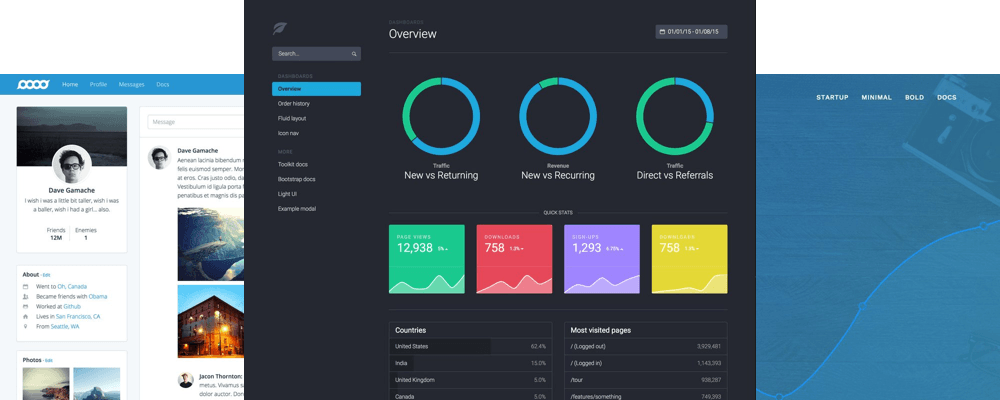
The Bootstrap grid system allows for the creation of flexible, responsive layouts. (Source: Bootstrap Documentation)
By building WordPress themes on top of the Bootstrap framework, developers can create templates that are:
-
Responsive and mobile-friendly: Bootstrap themes adapt seamlessly to any device, ensuring your site looks and functions great on smartphones, tablets, and desktops.
-
Faster to develop: Rather than coding every aspect from scratch, developers can leverage Bootstrap‘s pre-built components and layout system to accelerate development timelines.
-
Highly customizable: Most Bootstrap themes include intuitive options for tweaking colors, fonts, layouts, and more, all without diving into code. Developers can also efficiently extend the core framework.
-
Consistent and maintainable: Bootstrap provides a standardized set of conventions and best practices, making it easier to keep your code lean and organized as your site evolves.
The popularity of Bootstrap has skyrocketed since its initial release over a decade ago. As of 2023, Bootstrap powers over 27 million live websites, including 12% of the world‘s top 100,000 sites. Over 70% of developers say they have used Bootstrap.
With stats like that, it‘s no surprise that Bootstrap has also taken the WordPress world by storm. The official WordPress theme directory now boasts over 1,000 free Bootstrap-based themes, with many more premium options available from third-party marketplaces.
The Benefits of Starting With a Free Bootstrap Theme
For WordPress users on a budget, the abundance of high-quality free Bootstrap themes is a major boon. Here are just a few of the benefits of starting with a free option:
-
Cost savings: Keep your wallet happy and allocate resources to other aspects of your site or business. Many free Bootstrap themes are packed with premium-level features.
-
Faster launch: Get your site up and running in hours, not weeks. Free themes allow you to skip an extended design process and start publishing content right away.
-
Ability to experiment: Not sure what style of site you want? With free themes, you can test out multiple designs and layouts without a big commitment. It‘s easy to switch when you haven‘t paid.
-
Smooth learning curve: Most free Bootstrap themes are designed with simplicity in mind. You can master the basics of setup and customization, then graduate to more advanced options over time.
Of course, not all free themes are created equal. It‘s important to choose a theme that is up to date, well-reviewed, and built with quality code. Let‘s explore some key criteria to consider.
What to Look For in a Free Bootstrap WordPress Theme
When evaluating any WordPress theme, whether free or paid, there are certain core features and characteristics you should prioritize:
-
Responsive design: In our mobile-dominated digital landscape, having a responsive site is non-negotiable. Ensure any theme you consider adapts gracefully to all screen sizes, with legible text, tappable buttons, and intuitive navigation menus.
-
Cross-browser compatibility: Your theme should render properly across all modern web browsers, including Chrome, Firefox, Safari, and Edge. Most Bootstrap themes are rigorously tested, but it never hurts to preview the live demo on multiple browsers.
-
Customization options: While you may not need a dizzying array of settings, your theme should provide intuitive options for tailoring the design to your brand and content. Common customizations include site layout, header style, colors, fonts, and widgets.
-
Mobile performance: With Google now using mobile-friendliness as a ranking signal, it‘s critical that your theme loads quickly on phones and tablets. Preview the theme‘s demo on mobile and use a tool like Google‘s Mobile Website Speed Testing Tool to assess its performance.
-
Accessibility: Web accessibility is not only a legal and ethical imperative but also crucial for SEO. Your theme should follow best practices like proper heading structure, ARIA attributes, keyboard navigation, and sufficient color contrast.
-
Clean, commented code: Under the hood, your theme‘s code should be well-organized, properly indented, and liberally commented. This makes it easier for you or a developer to customize the theme and troubleshoot any issues.
-
Active development: Choose a theme that is regularly updated to stay compatible with the latest versions of WordPress and Bootstrap, as well as to patch any security vulnerabilities. Check the theme‘s changelog to see how often it receives updates.
-
Positive reviews: User feedback can speak volumes about a theme‘s quality, reliability, and ease of use. Browse the reviews and support forums to see what issues or praise come up frequently. Beware of themes with mostly one-word reviews.
-
Clear documentation: Your theme should include detailed documentation walking you through the setup process and explaining all the customization options. Bonus points for video tutorials and an FAQs section.
Once you‘ve narrowed down your options based on the above criteria, it‘s time to consider what style and layout will best suit your site‘s purpose.
Choosing The Right Style of Bootstrap Theme
One of the great things about Bootstrap themes is their versatility. No matter what type of WordPress site you‘re creating, chances are there‘s a template designed to fit your needs. Here are some of the most popular categories of Bootstrap themes:
Business & Corporate Themes
If you‘re creating a site for your company or organization, you‘ll want a theme that exudes professionalism and authority. The best business Bootstrap themes offer:
- Clean, modern designs with ample whitespace
- Prominent branding and logo placement
- Intuitive navigation menus
- Sections for showcasing services, team members, and testimonials
- Integration with popular page builders like Elementor or Beaver Builder
- [Example of a great business Bootstrap theme]
Portfolio & Agency Themes
For creatives looking to showcase their work online, a portfolio Bootstrap theme is the way to go. Common features to look for include:
- Multiple gallery and grid layout options
- Prominent hero sections for impactful project displays
- Stylish hover effects and lightbox image pop-ups
- Sections for client logos and testimonials
- Blog functionality to share your process and insights
- [Example of a great portfolio Bootstrap theme]
Blog & Magazine Themes
If content is king for your site, you‘ll want a Bootstrap blog or magazine theme designed to make your writing shine. Key features include:
- A variety of post layout options, such as standard, grid, masonry, and list
- Customizable homepage templates for featured content
- Stylish author bio boxes and related post widgets
- Optimized font stacks and typography settings for readability
- Built-in ad placement options for monetization
- [Example of a great blog Bootstrap theme]
eCommerce Themes
For WordPress users looking to sell products online, an eCommerce Bootstrap theme integrated with WooCommerce is essential. Top options include:
- Mobile-friendly shopping cart and checkout pages
- Product quick view lightboxes and zoom capabilities
- Multiple product page layouts and sidebar options
- Cross-selling features like related product sliders
- Prominent calls-to-action for sales and promotions
- [Example of a great eCommerce Bootstrap theme]
Now that you know what to look for, let‘s dive into our curated collection of the best free Bootstrap themes for WordPress in 2024.
[Insert list of 50+ free Bootstrap themes, with detailed descriptions, feature lists, screenshots, and links to the theme homepages and live demos. Organize by category as detailed in the outline.]Tips For Customizing Your Bootstrap Theme
One of the best things about Bootstrap themes is how easily you can tailor them to your unique needs and preferences. Here are some ways to make your site feel like your own:
Customize Colors & Fonts
Most Bootstrap themes allow you to easily customize the color scheme and typography via the WordPress Customizer or a built-in theme options panel. Experiment with different palettes and font pairings to capture your brand‘s personality.
Tweak CSS
For more granular control over your theme‘s appearance, you can add custom CSS. The WordPress Customizer includes a dedicated "Additional CSS" panel where you can input styles to override the default theme settings. For example:
/* Enlarge the site title */
.site-title {
  font-size: 2rem;
}

/* Add a background image to the header */
.site-header {
  background-image: url(‘path/to/image.jpg‘);
  background-size: cover;
  background-position: center;
}
Always test your changes on a staging site before deploying to production.
Create a Child Theme
If you plan on making extensive customizations to your Bootstrap theme, it‘s wise to create a child theme. This allows you to modify the theme‘s files without risking your changes being overwritten when the parent theme receives an update.
WordPress.org has a great tutorial on creating a child theme.
Leverage Page Builders
Many Bootstrap themes integrate with popular page builder plugins like Elementor, Beaver Builder, and Divi. These tools allow you to create custom page layouts using a drag-and-drop interface, without writing any code.
If your theme doesn‘t come with a page builder, you can usually install one separately and use it to design landing pages, homepages, and other key content.
Beyond The Theme: Keys to WordPress Success
Having a great Bootstrap theme is an excellent start, but it‘s just one piece of the puzzle. To create a truly successful WordPress site, you‘ll also need:
-
Quality hosting: Your hosting provider can make or break your site‘s performance and reliability. Look for a reputable host optimized for WordPress, with features like automatic updates, daily backups, and strong security.
-
Essential plugins: There are certain plugins every WordPress site needs, regardless of the theme. These include tools for SEO (like Yoast), performance (like WP Rocket), security (like Wordfence), and backups (like UpdraftPlus). [Link to article on must-have plugins]
-
Engaging content: No matter how great your theme looks, it won‘t do much good without compelling content to populate it. Focus on creating blog posts, pages, and other media that provide real value to your target audience. Optimize for search engines, but write for humans. [Link to SEO content guide]
-
Regular maintenance: WordPress sites require ongoing TLC to stay secure, speedy, and bug-free. Set aside time each month to update your themes and plugins, run backups, optimize your database, and check for broken links and 404 errors. If you can‘t handle these tasks yourself, consider hiring a maintenance service.
Free vs. Premium Bootstrap Themes
As you can see, there are tons of excellent free Bootstrap themes for WordPress available. So when does it make sense to shell out for a premium option? Here are some scenarios where you might want to invest:
-
You need advanced customization options: Premium themes often come with more granular control over site layout, colors, fonts, and other design elements. If you have very specific branding requirements, a paid theme may be necessary.
-
You want priority support: While some free themes offer support through WordPress.org forums or Github issues, premium themes usually include dedicated email or live chat support with guaranteed response times.
-
You need advanced functionality: Premium Bootstrap themes may include additional features not found in their free counterparts, such as mega menus, built-in form builders, popup managers, or WooCommerce extensions.
-
You want a truly unique design: With tens of thousands of installs, the most popular free themes can start to feel a bit ubiquitous. If you really want your site to stand out from the crowd, a premium theme can provide a more distinctive look.
So how much can you expect to spend? Most premium Bootstrap themes range from $30 to $100, with some high-end options costing up to $200 or more. While that may seem like a lot compared to free, it‘s still far less than hiring a developer to build a custom theme from scratch.
Ultimately, the decision comes down to your budget, needs, and goals. If a free Bootstrap theme checks all your boxes, there‘s no reason to spend money on a premium option. You can always upgrade later as your needs evolve.
Get Started With Free Bootstrap WordPress Themes
We‘ve covered a lot of ground in this guide, from the benefits of using a Bootstrap WordPress theme to how to choose and customize the perfect option for your site.
To recap, here are the key steps:
- Determine what type of site you‘re building (business, portfolio, blog, ecommerce) and what features you need.
- Browse the WordPress theme directory and reputable third-party marketplaces for free Bootstrap themes that fit your criteria.
- Evaluate each theme based on its responsive design, customization options, performance, accessibility, code quality, and user reviews.
- Install your chosen theme and use the WordPress Customizer or provided options panel to tweak the colors, fonts, layout, and other settings to your liking.
- Install and configure essential plugins for security, performance, SEO, and backups.
- Populate your site with engaging, keyword-optimized content that provides value to your target audience.
- Perform regular maintenance and updates to keep your site running smoothly.
If you follow these steps, you‘ll be well on your way to creating a professional, high-performing WordPress site without spending a dime on a theme.
Of course, if you have more advanced needs or simply prefer a more turnkey solution, there are plenty of great premium Bootstrap themes to choose from as well. Just be sure to do your due diligence and choose a reputable provider.
No matter which route you go, the most important thing is to get started and iterate as you go. Don‘t get so caught up in choosing the perfect theme that you never actually launch your site. Remember, you can always change your mind and switch themes down the road.
So what are you waiting for? Go forth and create something awesome with one of the fantastic free Bootstrap WordPress themes featured here. And if you have any questions or run into roadblocks along the way, don‘t hesitate to reach out to the WordPress community for help. Happy building!
![25 Webinar Landing Page Examples Proven to Convert in 2024 [With Design Tips from the Experts]](https://greenlitcontent.com/wp-content/uploads/2026/04/20260424000455-69eab3a795d1d.png)