Explaining That Stuff: A Comprehensive Guide to Science and Technology
Introduction
Welcome to our comprehensive guide on explaining science and technology! In this blog post, we'll take you on a journey through the fascinating world of how things work, breaking down complex concepts into easy-to-understand explanations. Our goal is to make science and technology accessible to everyone, from curious beginners to seasoned enthusiasts.
The A-Z of Science and Technology
A is for Atoms: The Building Blocks of Everything
Let's start our journey at the very foundation of matter itself – atoms.
Atoms are the tiny particles that make up everything around us. Think of them as the LEGO bricks of the universe. Just as you can build countless structures with LEGO, the different combinations of atoms create everything from the air we breathe to the devices we use every day.
Here's a simple way to visualize an atom:
- Imagine a tiny solar system
- At the center is the nucleus, like the sun
- Orbiting around it are electrons, like planets
- The nucleus contains protons (positively charged) and neutrons (neutral)
- The electrons are negatively charged
This basic structure is the same for all atoms, but the number of protons, neutrons, and electrons varies, giving us different elements like hydrogen, oxygen, or gold.
Real-World Applications
Understanding atoms is crucial for many fields:
- Chemistry: Knowing how atoms interact helps us create new materials and medicines.
- Physics: Atomic theory is the basis for understanding energy and matter.
- Electronics: Manipulating the behavior of electrons in atoms is how we create computer chips.
B is for Batteries: Powering Our Portable World
Batteries are everywhere in our modern lives, from our smartphones to our electric cars. But how do they work?
At its core, a battery is a device that stores chemical energy and converts it into electrical energy. Here's a simplified explanation:
- A battery has two ends: a positive terminal (cathode) and a negative terminal (anode).
- These terminals are separated by a chemical called an electrolyte.
- When you connect the battery to a device, a chemical reaction starts.
- Electrons flow from the negative terminal through your device to the positive terminal.
- This flow of electrons is what we call electricity, and it powers your device.
Types of Batteries
-
Alkaline Batteries: These are your typical AA or AAA batteries. They're cheap but not rechargeable.
-
Lithium-ion Batteries: Found in smartphones and laptops. They're rechargeable and hold a lot of energy for their size.
-
Lead-acid Batteries: Used in cars. They're heavy but can deliver a lot of power quickly.
The Future of Batteries
As we move towards more portable and renewable energy solutions, battery technology is evolving:
- Solid-state batteries: These could be safer and more efficient than current lithium-ion batteries.
- Graphene batteries: Potentially offering much faster charging times.
- Sodium-ion batteries: A potentially cheaper alternative to lithium-ion.
C is for Computers: The Machines That Changed Everything
Computers have revolutionized nearly every aspect of our lives. But how do these complex machines actually work?
At their most basic level, computers operate on a binary system – they only understand two states: on (1) or off (0). This might seem limiting, but by combining these binary digits (bits) in different ways, computers can represent and process vast amounts of information.
Here's a simplified overview of how a computer works:
- Input: Information is fed into the computer (e.g., via keyboard, mouse, or sensor).
- Processing: The Central Processing Unit (CPU) performs calculations and operations on this data.
- Memory: Data is stored in RAM (temporary) or on hard drives (long-term).
- Output: Results are displayed (e.g., on a screen) or used to control other devices.
Key Components of a Computer
- CPU (Central Processing Unit): The "brain" of the computer that performs calculations and executes instructions.
- RAM (Random Access Memory): Temporary storage for data that the CPU is actively using.
- Hard Drive: Long-term storage for files and programs.
- Motherboard: The main circuit board that connects all the components.
- Graphics Card: Handles processing for visual output, especially important for gaming and video editing.
From Mainframes to Smartphones
The history of computers is a story of incredible miniaturization and increased power:
- 1940s-1950s: Room-sized mainframes used by governments and large corporations.
- 1980s: Personal computers become available for home use.
- 1990s-2000s: Laptops make computing portable.
- 2010s-present: Smartphones put powerful computers in our pockets.
The Future of Computing
As technology advances, we're seeing exciting developments:
- Quantum Computing: Using quantum mechanics to perform certain calculations much faster than traditional computers.
- Artificial Intelligence: Computers that can learn and make decisions, potentially revolutionizing fields from healthcare to transportation.
- Internet of Things (IoT): Everyday objects connected to the internet, creating "smart" homes and cities.
D is for DNA: The Code of Life
DNA (Deoxyribonucleic Acid) is often called the "blueprint of life." It's a molecule found in every cell of every living organism, containing the instructions for building and maintaining that organism.
Think of DNA like a cookbook:
- The entire cookbook is the genome
- Each recipe is a gene
- The ingredients and instructions are the genetic code
Here's how it works:
- DNA is made up of four chemical bases: Adenine (A), Guanine (G), Cytosine (C), and Thymine (T).
- These bases pair up (A with T, C with G) to form the "rungs" of the DNA ladder.
- The sequence of these base pairs contains the information needed to build and maintain an organism.
The Double Helix
DNA's famous double helix structure was discovered by James Watson and Francis Crick in 1953. This structure is crucial to DNA's function:
- It allows for easy replication when cells divide
- It provides a stable way to store genetic information
DNA in Action
- When a cell needs to make a protein, it first copies the relevant part of the DNA into a molecule called RNA.
- This RNA then moves out of the cell nucleus to the ribosomes.
- Ribosomes "read" the RNA and use it as instructions to build proteins.
- These proteins then carry out various functions in the body.
Real-World Applications
Understanding DNA has led to numerous advances:
- Genetic Testing: Identifying potential health risks or diagnosing genetic conditions.
- Forensic Science: Using DNA evidence to solve crimes.
- Personalized Medicine: Tailoring treatments based on an individual's genetic makeup.
- GMOs: Creating crops with desired traits like disease resistance.
E is for Energy: The Driving Force of the Universe
Energy is a fundamental concept in science, defined as the capacity to do work. It comes in many forms, and understanding energy is key to understanding how the world around us functions.
Forms of Energy
- Kinetic Energy: The energy of motion. A moving car has kinetic energy.
- Potential Energy: Stored energy due to position or state. A stretched rubber band has potential energy.
- Thermal Energy: The energy of heat. The sun provides thermal energy to Earth.
- Chemical Energy: Energy stored in chemical bonds. Batteries use chemical energy.
- Electrical Energy: Energy from the flow of electric charge. This powers our homes and devices.
- Nuclear Energy: Energy released from the nucleus of atoms. This powers nuclear plants and the sun.
The Law of Conservation of Energy
One of the most important principles in physics is that energy cannot be created or destroyed, only converted from one form to another. This is known as the Law of Conservation of Energy.
For example:
- In a hydroelectric dam, the potential energy of water is converted to kinetic energy as it falls, which is then converted to electrical energy by turbines.
- In a car engine, chemical energy from fuel is converted to thermal energy (heat) and kinetic energy (motion).
Energy in Our Daily Lives
Understanding energy helps us make sense of many everyday phenomena:
- Renewable Energy: Solar panels convert light energy to electrical energy.
- Exercise: Our bodies convert chemical energy from food into kinetic energy for movement.
- Cooking: We use various forms of energy (electrical, chemical, thermal) to prepare food.
The Future of Energy
As we face challenges like climate change, the future of energy is a hot topic:
- Clean Energy: Developing more efficient solar, wind, and other renewable sources.
- Energy Storage: Improving battery technology to store renewable energy.
- Fusion Energy: Attempting to harness the power of nuclear fusion, the same process that powers the sun.
F is for Fiber Optics: The Backbone of the Internet
Fiber optic technology has revolutionized communications, enabling the high-speed internet connections we rely on today. But how does it work?
The Basics of Fiber Optics
Fiber optic cables use light to transmit data over long distances. Here's how:
- The cable consists of a very thin strand of glass or plastic (the "fiber").
- This fiber is surrounded by a material that reflects light back into the fiber (the "cladding").
- Data is converted into pulses of light.
- These light pulses travel down the fiber, bouncing off the cladding.
- At the other end, a receiver converts the light pulses back into data.
Advantages of Fiber Optics
- Speed: Light travels much faster than electrical signals in copper wire.
- Bandwidth: Fiber can carry much more data than traditional cables.
- Low Signal Loss: The signal can travel further without degrading.
- Immunity to Electromagnetic Interference: Unlike copper wires, fiber optics aren't affected by nearby electrical equipment.
Real-World Applications
- Internet: Fiber optic cables form the backbone of the global internet.
- Telecommunications: Many phone lines now use fiber optics.
- Medical Imaging: Fiber optics enable detailed internal imaging like endoscopy.
- Lighting: Fiber optics can be used for decorative lighting or to bring natural light into buildings.
The Future of Fiber Optics
As our demand for data continues to grow, fiber optic technology is evolving:
- Hollow-core fibers: These could potentially transmit data even faster than current fibers.
- Quantum communication: Fiber optics could enable ultra-secure communication using quantum principles.
G is for Genetics: The Science of Heredity
Genetics is the study of genes, heredity, and variation in living organisms. It helps us understand how traits are passed from parents to offspring and how organisms evolve over time.
Key Concepts in Genetics
- Genes: Segments of DNA that code for specific traits.
- Chromosomes: Structures made of DNA that carry genes.
- Alleles: Different versions of the same gene.
- Genotype: The genetic makeup of an organism.
- Phenotype: The observable characteristics resulting from the genotype.
How Genetics Works
- Every organism inherits two copies of each gene, one from each parent.
- These genes can be dominant (always expressed), recessive (only expressed if both copies are recessive), or somewhere in between.
- The combination of genes an organism inherits determines its traits.
For example, in pea plants:
- The gene for purple flowers is dominant (P)
- The gene for white flowers is recessive (p)
- A plant with PP or Pp will have purple flowers
- Only a plant with pp will have white flowers
Genetic Disorders
Some genetic disorders occur when there's a mutation in a gene or an abnormal number of chromosomes:
- Down syndrome: Caused by an extra copy of chromosome 21
- Cystic fibrosis: Caused by mutations in the CFTR gene
- Huntington's disease: Caused by a mutation in the huntingtin gene
Applications of Genetics
- Medicine: Understanding genetic disorders and developing treatments
- Agriculture: Breeding plants and animals with desired traits
- Forensics: Using DNA evidence in criminal investigations
- Conservation: Studying genetic diversity in endangered species
The Future of Genetics
Advances in genetic technology are opening up new possibilities:
- Gene Therapy: Treating diseases by modifying a person's genes
- CRISPR: A powerful tool for editing genes with high precision
- Personalized Medicine: Tailoring treatments based on an individual's genetic makeup
H is for Holograms: 3D Images in Thin Air
Holograms are three-dimensional images created by the interference of light beams. Unlike traditional photographs, holograms allow you to see different perspectives of an image as you move around it.
How Holograms Work
- A laser beam is split into two beams:
- The object beam, which illuminates the subject
- The reference beam, which goes directly to the recording medium
- Light from the object beam reflects off the subject and interferes with the reference beam
- This interference pattern is recorded on a special photographic plate
- When light (similar to the reference beam) shines on the developed plate, it recreates the 3D image
It's like capturing a "light sculpture" of the object!
Types of Holograms
- Transmission Holograms: Viewed by shining light through them
- Reflection Holograms: Viewed using ordinary white light, like those on credit cards
- Computer-Generated Holograms: Created entirely by computer algorithms
Real-World Applications
- Security: Holograms on credit cards and banknotes to prevent counterfeiting
- Medical Imaging: 3D images of organs for diagnosis and surgical planning
- Data Storage: Holographic data storage could potentially store much more data than current methods
- Entertainment: Holographic displays for gaming and virtual reality
The Future of Holography
As technology advances, we're seeing exciting developments:
- Holographic Telepresence: 3D video calls that make it seem like the person is in the room with you
- Holographic Displays: Screens that can show true 3D images without special glasses
- Augmented Reality: Overlaying holographic images on the real world
I is for Internet: The Global Network
The Internet is a vast network of interconnected computers that spans the globe. It's revolutionized how we communicate, work, and access information.
How the Internet Works
- Devices: Computers, smartphones, servers, etc., connect to the network
- IP Addresses: Each device has a unique address, like a phone number
- Routers: Direct data packets between devices
- Protocols: Rules that govern how data is transmitted (e.g., HTTP for websites, SMTP for email)
When you visit a website:
- Your device sends a request to the site's server
- The server responds with the website data
- Your browser interprets this data and displays the website
Key Components of the Internet
- World Wide Web: The system of interlinked documents accessed via the Internet
- Email: Electronic messaging system
- File Transfer Protocol (FTP): For uploading and downloading files
- Internet of Things (IoT): Connected smart devices
The Impact of the Internet
The Internet has transformed many aspects of society:
- Communication: Instant messaging, video calls, social media
- Commerce: Online shopping, digital payments
- Education: Online courses, access to vast information resources
- Entertainment: Streaming services, online gaming
The Future of the Internet
As technology evolves, we can expect:
- 5G and Beyond: Faster, more reliable connections
- Quantum Internet: Ultra-secure communication using quantum principles
- Brain-Computer Interfaces: Direct neural connections to the Internet
J is for Jet Engines: Powering Modern Aviation
Jet engines have revolutionized air travel, allowing for faster, higher, and more efficient flights. But how do these powerful machines work?
The Basics of Jet Propulsion
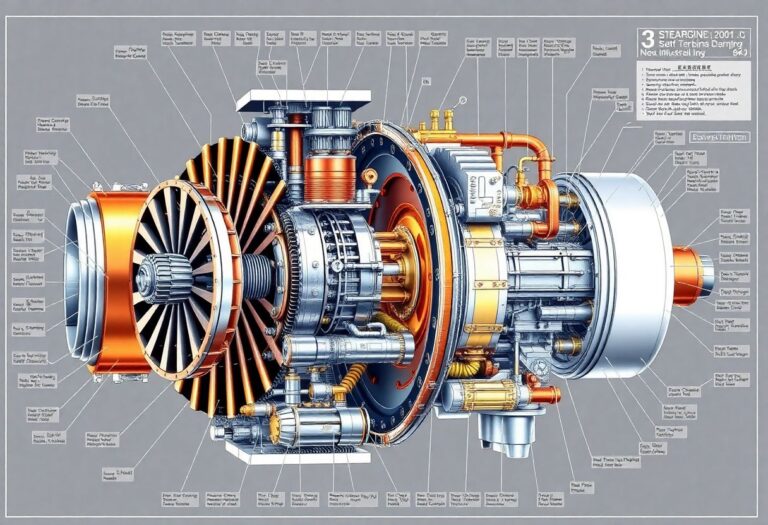
A jet engine operates on a simple principle: it takes in air at the front, compresses it, mixes it with fuel, ignites the mixture, and then expels the hot gases out the back. This expulsion of gases provides the thrust that propels the aircraft forward.
Here's a step-by-step breakdown:
- Intake: Air is drawn into the engine through the front.
- Compression: The air is squeezed to increase its pressure.
- Combustion: Fuel is injected and ignited, creating hot, expanding gases.
- Exhaust: These gases are expelled at high speed out the back.
This process is continuous, providing constant thrust.
Types of Jet Engines
- Turbojet: The simplest type, used in early jet aircraft.
- Turbofan: Most common in modern airliners. It has a large fan at the front that provides most of the thrust.
- Turboprop: Uses a jet engine to drive a propeller, common in smaller, slower aircraft.
- Ramjet: Used in very high-speed aircraft, it has no moving parts and relies on